

Solution
Settings, environments and packaging for the whole solution you are building.
- Solution Settings
- Environments
- Variables
- Packages
- Extensions
- Plugin Manager
- Localization
+2 moreShow fewer
- Master Data
- Version History
Features
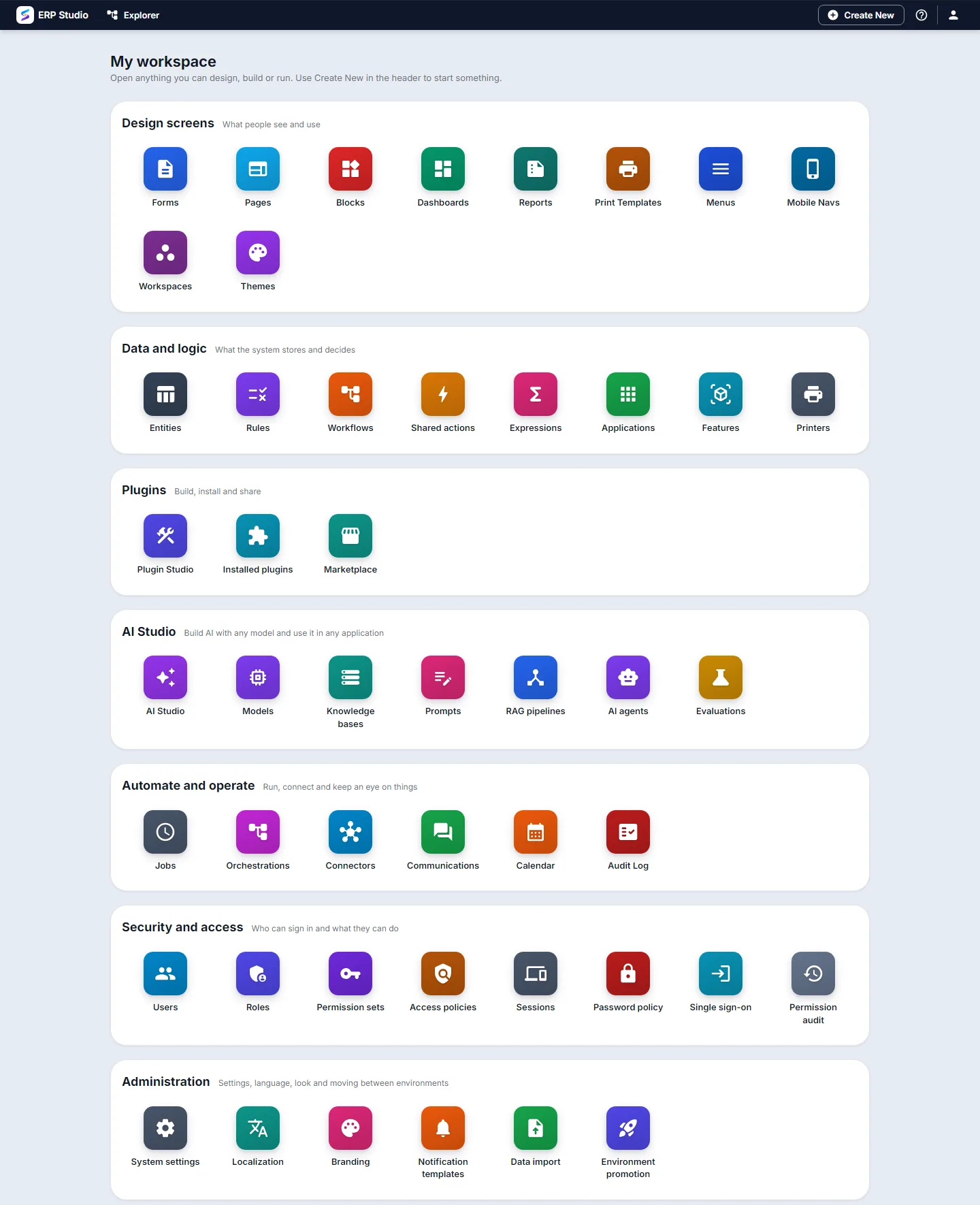
Spark ERP Studio is where you design screens, model data, automate work, build AI, secure access and run the platform. This is the whole tree: 7 areas and 51 features, exactly as they appear in your workspace.
Choose an area to jump to it. Features that have their own page are links.
What people see and use
Forms
Data-entry screens with fields, rules, validations and events, published as versions so users never see a half-edited form.
Pages
Screens built from blocks on a responsive grid, with a separate layout for phone, tablet and desktop.
Blocks
Reusable building blocks, including composite blocks, that you place on pages.
Dashboards
Pages of KPIs and charts over your data.
Reports
Grid and chart reports over your data, with filters and export.
Print Templates
Designed documents such as invoices and letters, exported to PDF, Word, Excel or thermal printers.
Menus
The navigation menus people see in each application.
Mobile Navs
Phone navigation, designed separately from the desktop menu.
Workspaces
Workspace layouts that group the screens a role works in.
Themes
Design tokens for colour, font, spacing and density, with ready-made presets that apply from the company down to a single page.
What the system stores and decides
Entities
Define your data (fields, types, relationships) and get a real table and API for it.
Rules
Rules that react to events such as an order being created.
Workflows
Multi-step business processes with tasks, approvals, conditions and AI steps.
Shared actions
Reusable actions that any screen, rule or workflow can call.
Expressions
A library of named calculations reused across forms, pages and rules.
Applications
Group entities, screens and workflows into an application you can install.
Features
Split an application into modules that can be switched on per tenant.
Printers
The printers that print templates and receipts are sent to.
Build, install and share
Create, validate, build and publish plugins that bundle the pages, data, workflows and permissions of one area of your ERP.
Installed plugins
See what is installed, and upload a package to load new code into the running platform without a restart.
Find and install packages, extensions and themes.
Build AI with any model and use it in any application
A guided checklist, the last seven days of model calls, and export or import of everything you build as one bundle.
Connect any OpenAI-compatible model with your own key, name it as a profile, set a fallback, and see price and usage.
Use any embedding model, not only one provider; vectors are stored in your own tenant database.
Turn documents into passages and search them by meaning and by exact words, with a test screen that shows what a question finds.
Write prompts with variables, save versions, release with labels such as prod, and try them in a playground.
Answer questions from your knowledge with citations, and see what every step did.
Give a model tools and knowledge at an autonomy level you choose, with approvals and a trace of every step.
Check requests and answers for personal data, prompt injection and blocked terms, and flag, mask or block.
Score a prompt or pipeline on test questions and compare runs before you release a change.
Call your AI from any application through an OpenAI-compatible endpoint with app API keys, and watch calls, tokens and cost.
Run, connect and keep an eye on things
Jobs
Scheduled and background jobs, with their run history.
Integration Flows
Model multi-step calls to other systems as a managed flow.
Connect accounts for finance, integration (GraphQL, SOAP, SFTP), calendar sync, LDAP and identity provisioning.
Communications
Send messages across channels such as email and SMS, with templates, routing and delivery tracking.
Calendar
A calendar of events and schedules.
A trail of who did what across the platform.
Who can sign in and what they can do
Users
Accounts, roles, sign-in security and devices.
Roles
Roles that bundle permissions for a job.
Permission sets
Reusable bundles of permissions you can assign to people or roles.
Access policies
Fine-grained rules for who may do what to which data, with field masking, schedules and versioning; a deny always beats an allow.
Sessions
See and end active sessions.
Password policy
Password rules enforced on every account creation and password change.
Enterprise identity federation, and automatic user and group provisioning from your identity provider.
Permission audit
A read-only trail of every change to roles, permission sets and user overrides.
Settings, language, look and moving between environments
System settings
Tenant-wide toggles that apply to every user unless overridden.
Localization
Language, date, number and currency defaults for the organisation, with personal preferences on top and locked fields where you need them.
Branding
Your logo, colours and fonts.
Notification templates
Edit the subject and body of each system notification, per language.
Import CSV into any entity: map the columns, preview the result, then run it through the same validation as a manual entry.
Environment promotion
Promote what you built in a sandbox tenant to production after previewing the differences.
One workspace for the whole product: every area below is a real part of Studio, not a roadmap.
15 areas · 164 features
Settings, environments and packaging for the whole solution you are building.
Group entities, screens and workflows into installable applications, and split them into modules you switch on per tenant.
The pages, forms and reusable widgets people work in, with separate layouts for phone, tablet and desktop.
How people move around: menus, phone navigation and workspaces for each role.
Define what the system stores; get a real table and API for each entity.
What the system decides and does: processes, rules, approvals and scheduled work.
Grid and chart reports, BI reports, dashboards and printed or exported documents.
Document management: types, metadata, templates, OCR, versions, retention and approval.
Roles and permissions down to field, record, screen, report and API level; users, sessions and sign-in pages; the audit trail.
Connect other systems: connections, flows, APIs, webhooks, mappings, messaging and payment gateways.
Build with AI: models, knowledge, prompts, agents and bots, with guardrails and evaluation.
Reach customers and staff: journeys, broadcasts, audiences and contact rules.
Publish websites, and portals for customers, partners and staff, built from the same blocks as the rest of the product.
Run the platform: monitoring, backup, settings, jobs, branding and moving data in and between environments.
Source control, builds and deployments for what you build.
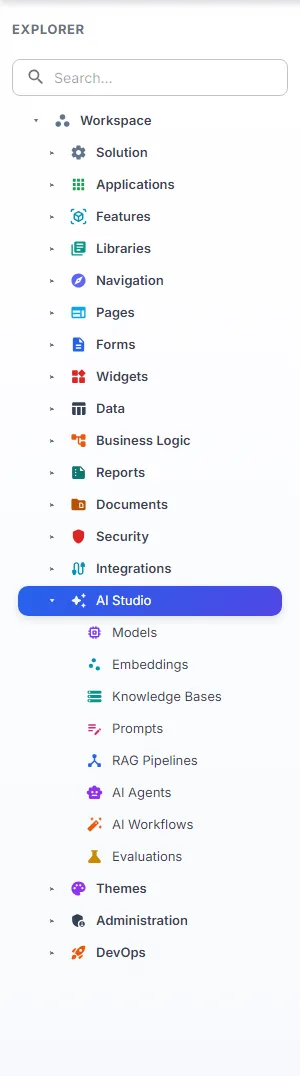
The screens below are Studio itself, not a mock-up: My workspace opens every feature above, and the Explorer tree holds the same areas, each with its own icon.
Tell us what you want to build and we will show you the parts of this tree that get you there.